Session Block Profile
AsksWhat does 10:30 to 11:00 usually look like?
Shows when this instrument has historically been active, quiet or moving without much progress.
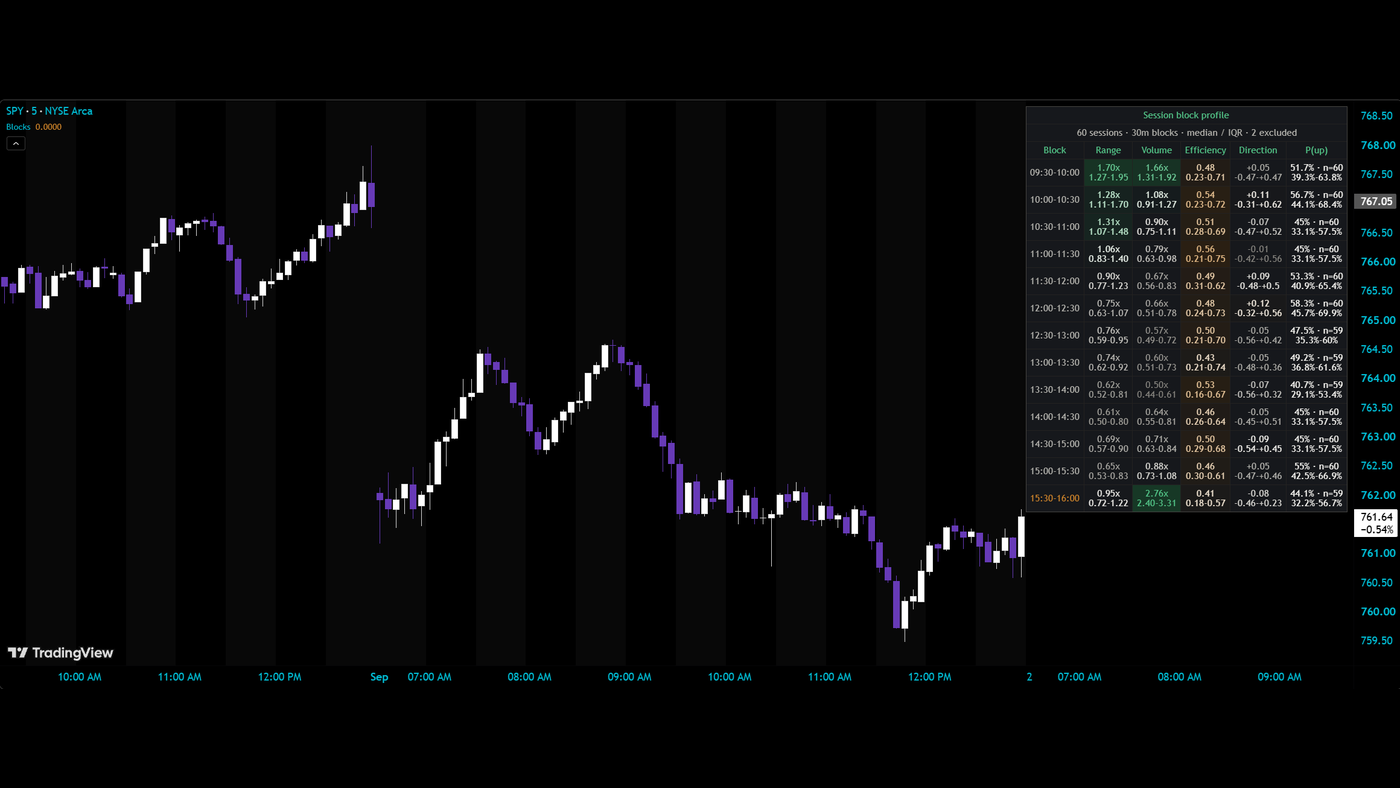
What it measures and how
Session Block Profile turns the regular session into a clock-time map. It divides the day into equal blocks—30 minutes by default—and summarizes those blocks across previous complete sessions.Range and volume are measured relative to each day's typical block, alongside efficiency, signed direction and the historical share of blocks that closed up. The result describes when this instrument has tended to move, trade heavily or spend its range without much net progress.
Get started
- Open the TradingView script using the link above and add it to the intraday chart you want to study.
- Locate the clock block you are interested in. The default block length is 30 minutes; compare the block boundaries on the chart with the table.
- Read range and volume together to distinguish historically active blocks from quieter ones, then check efficiency for how much of the range the body traveled.
- Read signed direction and the up-close share alongside the confidence interval. The direction history is separate from how active the block tends to be.
- If you use the optional active-block marker or alert, treat it as a notice that a historically active time window has begun. It does not call the direction of that block.
How to read it
Range and volume in contextEach session is normalized before it enters history. A block's range and volume are expressed against that day's typical block, reducing the influence of an unusually large or busy day on the clock-time comparison.
Activity is different from progressA block can cover a large range without making much net progress. Efficiency describes how much of the block's range the body traveled, adding context that range and volume alone cannot provide.
Direction with its uncertaintyThe signed-direction reading and up-close share describe the historical sample. Read the confidence interval with the share: a percentage without its uncertainty can make an ordinary or thin sample look more decisive than it is.
Complete sessions onlyA session is committed only when every expected bar is present. This prevents a partial session from being treated as a complete clock profile. The sample therefore reflects usable complete sessions, not simply every date visible on the chart.
Know the limits
A historically active block can be quiet today. The profile describes previous sessions and does not guarantee the next block's activity or direction.
The complete-session rule can reduce usable history where the feed has gaps or the session is shortened.
The active-block alert is a time-of-day notification. It does not establish an entry, exit or directional signal.
Open source, no email wall. Read the code, test it on your own chart, and keep it. Explore all 20 free tools.
Keep the tool.
Add a second read.
Session Block Profile shows how activity has varied through the session. Keep that focused view.
The paid MIZAN engine runs on TradingView. It adds the market read, the score and explained blocked setups for the candidates it detects. Reversal setups that pass get entry, stop and target references.
MIZAN is a separate engine, not a bundle of these free tools. Compare its read with your own method.
See passed setups, blocked setups and losses →
7-day trial starts at checkout · From $79.99/month afterward · Cancel through Whop · Manual access within six hours after checkout and receipt of your correct TradingView username