Time-of-Day Volume Normalizer
AsksIs this a lot of volume for this time of day?
Compares volume with the same time of day in previous complete sessions.
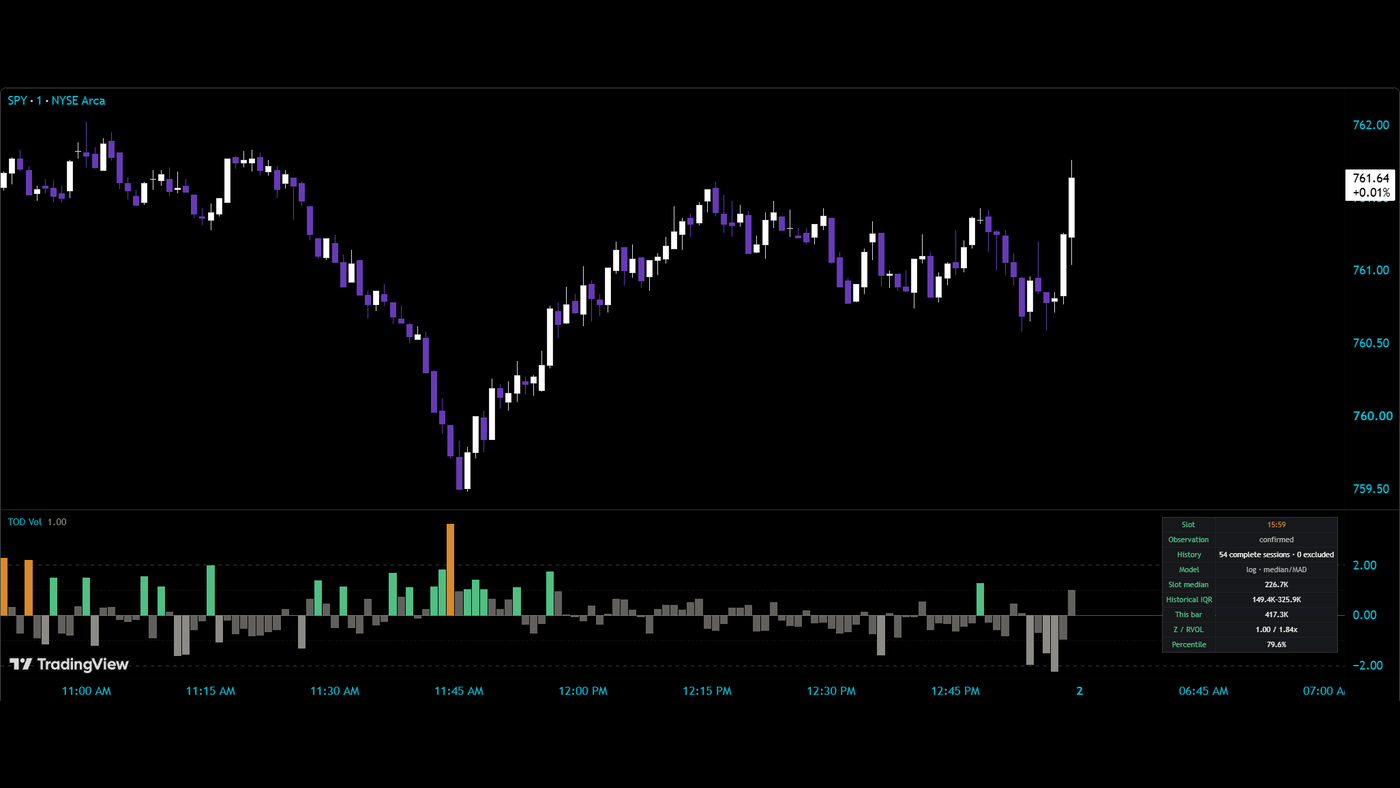
What it measures and how
The opening minutes and the lunch hour have different volume patterns. Time-of-Day Volume Normalizer compares a bar with the same clock slot in previous complete sessions, giving you a cleaner view of whether participation is unusual for that moment.Its median baseline and robust spread describe the typical slot; the z-score, relative-volume multiple and percentile offer three ways to read the current bar against that history.
Get started
- Open the TradingView script using the link above and add it to the intraday chart you want to study.
- Check the panel's clock slot, history and model before interpreting the histogram. The comparison depends on having usable previous sessions for that slot.
- Read relative volume alongside the z-score and percentile. They describe the same bar from different angles: size versus the baseline, distance from the typical reading and rank within the historical comparison.
- Use completed bars for a settled reading. The live bar is provisional while its volume is still accumulating.
- Check the exclusion count when history looks thinner than expected. Half days and sessions with data gaps are excluded as whole sessions.
How to read it
Same clock, better comparisonA busy opening bar can be ordinary for the open, while a smaller lunch-hour bar can be unusually active for lunch. The baseline follows the clock slot instead of averaging those different parts of the day together.
Three readings, three questionsThe relative-volume multiple describes volume against its slot baseline. The z-score describes how unusual the reading is relative to the slot's typical level and spread. The percentile shows its historical rank. A high percentile is a volume observation, not a probability that price will rise.
Why log volume is the defaultVolume is skewed: occasional very large bars can sit far above most observations. The default log-volume model addresses that shape. Read the displayed model when interpreting the score; a z-score is not a count of shares or contracts.
History has an admission ruleA session enters the historical comparison only after it is complete. Excluding incomplete sessions keeps partial days and gaps from being treated as ordinary examples of that clock slot, but it also means fewer usable sessions can remain.
Know the limits
Unusual volume describes participation. It does not identify buying versus selling pressure or establish a trade direction.
The baseline reflects the available complete sessions. A small history or a change in trading activity can make that history less representative of today.
The current bar is provisional. Its reading can change as additional volume arrives before the bar closes.
Open source, no email wall. Read the code, test it on your own chart, and keep it. Explore all 20 free tools.
Keep the tool.
Add a second read.
Time-of-Day Volume Normalizer compares volume with the same part of earlier sessions. Keep that focused view.
The paid MIZAN engine runs on TradingView. It adds the market read, the score and explained blocked setups for the candidates it detects. Reversal setups that pass get entry, stop and target references.
MIZAN is a separate engine, not a bundle of these free tools. Compare its read with your own method.
See passed setups, blocked setups and losses →
7-day trial starts at checkout · From $79.99/month afterward · Cancel through Whop · Manual access within six hours after checkout and receipt of your correct TradingView username