Precedent — Projection Pivots
AsksWhich old levels is price still sworn to?
Extends confirmed swing highs and lows into support, resistance and projected lines.
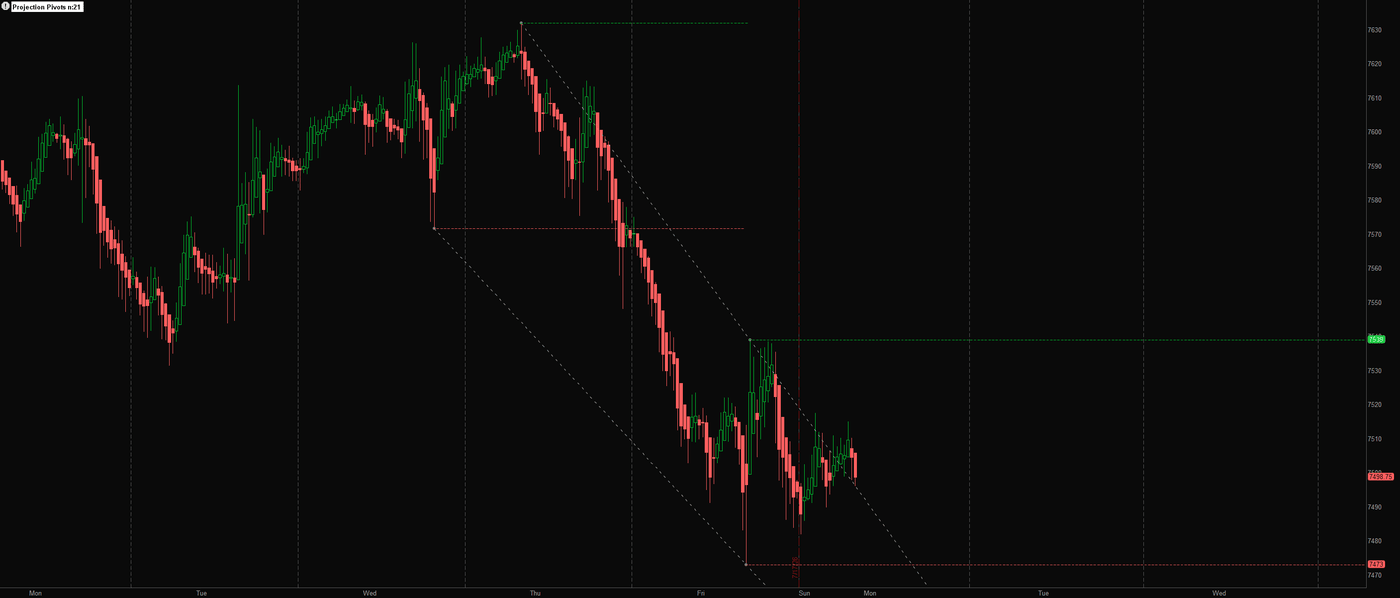
What it measures and how
Past pivots are precedent. This study extends the latest confirmed swing high and low as horizontal references, then draws sloping projections through the last two confirmed highs and lows. It separates an established price level from a projection that updates as new structure enters the record.
Get started
- Install the complete thinkScript through Charts → Studies → Edit Studies → Create in thinkorswim desktop and apply it to your price chart.
- Load enough chart history for the selected pivotStrength. Each pivot requires bars on both sides, and each projection requires two confirmed pivots of the same type.
- Read the latest resistance and support values in the label, then distinguish the horizontal pivot levels from the light-gray sloping projections.
- When reviewing a historical pivot dot, account for the later bars needed to confirm it. The dot's location is not the time when the pivot first became knowable.
How to read it
A level has to earn its placeA candidate pivot high must match the high across its full two-sided window; the low uses the equivalent minimum test. The study evaluates that candidate only after the required bars on its right exist.
Levels and projectionsHorizontal lines use the latest confirmed pivot prices. A projection takes the slope between the last two confirmed highs or lows and extends it forward from the most recent pivot.
Reading a new precedentA newly confirmed pivot replaces the corresponding latest horizontal reference and can change the projection's direction. The older pivot's price remains the same, but the active reference is updated.
Know the limits
Pivot dots are placed back on their original candles after confirmation. A historical chart therefore displays information that was unavailable at the turn itself.
Projection lines change as new pivots confirm. They describe the slope of prior structure, not a promised future path.
The active confirmation window uses the current bar's high and low, so a developing candidate can still change before that bar finishes.
Open source, no email wall. Read the code, test it on your own chart, and keep it. Explore all 20 free tools.
Keep the tool.
Add a second read.
Precedent projects levels from confirmed swing highs and lows. Keep that focused view.
The paid MIZAN engine runs on TradingView. It adds the market read, the score and explained blocked setups for the candidates it detects. Reversal setups that pass get entry, stop and target references.
MIZAN is a separate engine, not a bundle of these free tools. Compare its read with your own method.
See passed setups, blocked setups and losses →
7-day trial starts at checkout · From $79.99/month afterward · Cancel through Whop · Manual access within six hours after checkout and receipt of your correct TradingView username