MIZAN Flow · preview guide · v1.0.2

Read the chart.
Understand the marks.

What each label measures, when it becomes available, and what to check when the chart gets quiet.

Flow is not open for purchase yet. View launch status on Whop. This guide describes the current preview. Bar Replay has a known memory-limit issue. Read the limitations before using the preview.

One chart. Three things to check.

Use TradingView Premium or Ultimate and a standard candlestick chart. Start with an instrument and timeframe you already understand.

  1. Check the source.

    Open Settings → Inputs → Display and turn Status bar on while learning. Read candle: and block:; footprint, intrabars and estimate are different kinds of evidence.

  2. Check the block.

    Read its actual duration. A requested 5-minute lens uses 6-minute blocks on a 3-minute chart. Give the trend and averages time to warm up.

  3. Inspect one mark.

    Find its meaning below. Note when it became available, then compare it with your own trading rules. A mark is not an instruction to enter.

Keep your chart readable.

The status panel and optional candle recoloring are off by default. Your existing candle colors stay intact. Turn the panel on when checking data sources, then hide it again for a clean chart. When enabled, it appears bottom center at normal size.

When access opens, use the exact script named in your access confirmation under Indicators → Invite-only scripts. Do not purchase Core to obtain Flow.

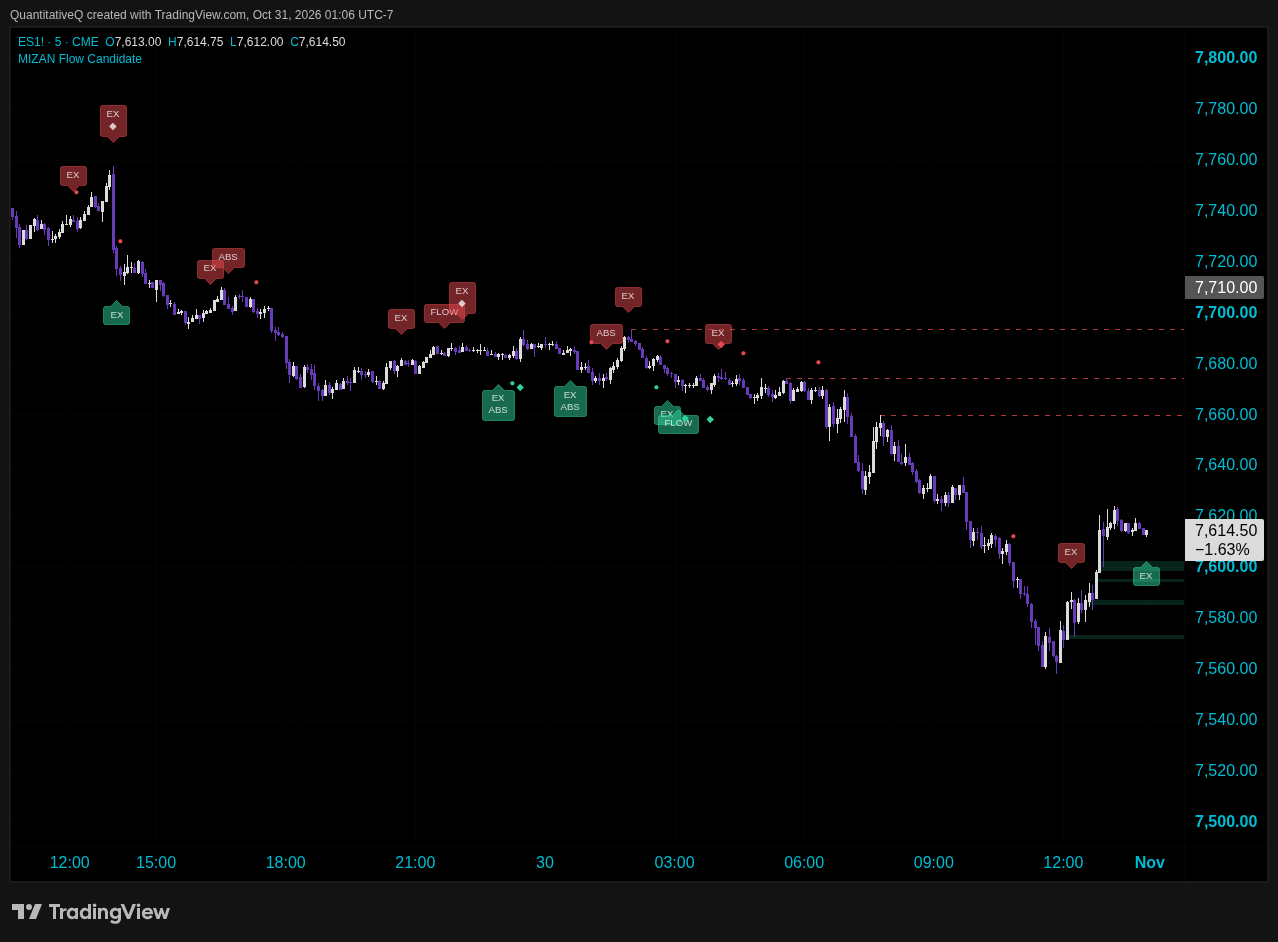
ACTUAL TRADINGVIEW CHART · ES · 5 MINTap the chart to inspect
MIZAN Flow on an ES five-minute chart with FLOW, ABS and EX labels, swing diamonds, imbalance zones and dashed auction levels; status panel hidden
Actual ES five-minute chart · October 29–30, 2026. MIZAN Flow v1.0.2 preview on CME_MINI:ES1!, standard candles, ETH, UTC−7. White up / purple down; status panel hidden; trend guard on. Historical display example, not a live feed or performance result. Marks have confirmation delays described below.

The label dictionary

What you are actually looking at.

Green and red indicate the direction of the observation. They do not mean “buy now” and “sell now.” Marks can coexist or be suppressed by the trend guard. When several marks share one candle and side, the candidate combines them into one label with separate lines. A combined circle or diamond is shown as ● or ◆.

FLOW

Flow changes before price trend.

The retained flow state changes to bullish while the block price trend is still down, or bearish while the price trend is still up.

The default setting requires a change of side. A brief neutral pause followed by the same side does not print another FLOW.

Available on the next block’s first tick. Drawn on the completed block’s last candle.

“Leads” describes current disagreement. It does not establish that price will follow.

FLOW+

Flow change plus stacked imbalance.

A FLOW event also has qualifying stacked imbalances in the same direction within that completed block.

The default stack is at least three consecutive qualifying price levels, using the 300% imbalance setting.

Same timing as FLOW: next block’s first tick, drawn one candle back.

The plus means an additional condition, not a stronger proven probability.

● CIRCLE

Flow turns with the price trend.

The flow state changes into the direction of the block’s price trend. It is not a fresh price-trend flip or a trade entry.

A block event. Available next block; placed on the previous candle.

Flow and price-trend warm-up must finish before this event can print.

ABS

Possible absorption.

A block with above-average volume closes against its classified delta. By default, delta must oppose the close by at least 15% of block volume.

Every candle in the block must have usable footprint totals. Mixed-source blocks do not qualify.

A block event. Available next block; placed on the previous candle.

This is a price/volume condition. It does not identify a hidden buyer, seller or institution.

EX

Thin volume at a fresh extreme.

At a fresh or equal high/low over the lookback, the aggressive side’s volume at the extreme is thin relative to the average price row. The candle also closes away from the extreme.

Defaults: 10-candle lookback and a 15% extreme-row threshold. Usable row data and at least four footprint rows are needed.

Finalizes at the candle close. Same-side spacing and the trend guard can withhold it.

“Exhaustion” is a condition name. The move can continue afterward.

COLORED ZONE

A qualifying imbalance run.

A shaded zone covers a qualifying run of stacked price-level imbalances. By default, its candle volume must meet the 20-candle average.

A green zone retires when a candle closes below its lower edge. A red zone retires when a candle closes above its upper edge.

Created and retired on closed candles. The oldest zones also retire when the configured count is exceeded.

A zone is not a guaranteed support or resistance level.

DASHED LINE

An unfinished auction at a swing.

The pivot’s extreme price row has classified volume on both sides. The line marks that level once the swing is confirmed.

The line retires when price trades back to the level, evaluated on a closed candle, or when the live-line count is exceeded.

Default: three later pivot candles and confirmation at close. Drawn back from the original swing.

A line does not imply that price must return. The chart omits retired lines.

CANDLE COLOR

Price and delta disagree.

Optional green coloring: price closes up against sufficiently negative delta. Red: price closes down against sufficiently positive delta.

Defaults require at least 20% opposing delta and volume meeting its 20-candle average. Footprint or intrabar data is needed.

Finalizes at candle close. The example has this coloring switched off.

Older brochure wording called these “hidden buyers/sellers.” The code cannot observe hidden orders or identities.

◆ DIAMOND

Price/CVD swing divergence.

A lower price swing low has a higher CVD low, or a higher price swing high has a lower CVD high. The compared swings must share a CVD reset segment, with no missing-data or estimate-only stretch between them.

Defaults compare swings no more than 60 candles apart, with three pivot candles on each side.

Only available after three later candles by default and the confirming candle’s close. Drawn back on the swing.

Historical placement is not when you could have acted on the information.

One label can contain several observations.

Each line keeps its own availability time. A later block or swing confirmation can add a line to an earlier candle’s annotation. The candidate retains the latest 500 annotation objects; older annotations retire. This is not a complete permanent event ledger.

The optional status panel, translated.

It is hidden by default. Turn on Settings → Inputs → Display → Status bar to see four rows: CVD; flow and price trend; agreement and guard; data sources.

Use it when learning the marks or checking missing data. The current candle can use a different source from the last completed flow block. Hiding the panel also hides its data-quality warnings.

CVD +/− number
The sum of selected-source delta since the reset, including any permitted estimates. Positive and negative describe that accumulation, not your account balance or a forecast. Read its data-quality qualifier before comparing swings.
CVD quality qualifier
“Incomplete” means missing candles occurred since reset. “Mixed” means more than one data tier contributed; “estimate” or “intrabars” identifies an accumulation using only that fallback type. Today’s candle being footprint does not make the entire accumulated CVD footprint-only.
▲ / ▼ beside CVD
The sum of available selected-source delta over the last five chart candles. It includes the live candle, so it can change before close and disagree with the cumulative CVD sign. It does not certify that all five candles have complete data.
Flow 5m / 6m / 15m
The actual rounded block duration. Flow builds blocks from whole chart candles; the requested duration is not always the effective duration. “Warming up” means enough flow and price-trend history has not accumulated. Defaults need at least 11 completed price blocks and 4 valid flow blocks; missing data can extend the wait.
BULL / BEAR / NEUTRAL
The retained flow state. Entry needs two consecutive valid blocks moving the same way and smoothed flow beyond the entry threshold. A contradicted state can become neutral before the opposite state qualifies.
The percentage
An EMA-smoothed percentage of each valid completed block’s delta relative to that block’s volume. Missing blocks hold the prior EMA instead of adding zero flow. The display rounds the number; state checks use its unrounded value. It is not a score or probability.
price up / down
The block price-trend direction from the indicator’s ATR-based calculation. It is separate from the flow state.
Aligned / FLOW LEADS / Flow neutral
Aligned means flow state and price direction agree. FLOW LEADS means they oppose each other. Neutral means no directional agreement is reported. This ongoing status is not necessarily a newly printed FLOW event.
Guard ▲ / ▼ / off
Once its established-trend checks pass, the guard withholds opposing FLOW, FLOW+, circles, ABS, EX and diamonds until the block price trend flips. An incomplete block cannot newly activate it. A guard already on can remain on; zones, auction lines and candle coloring are separate.
block: source
The last completed block’s provenance: footprint, intrabars, estimate, mixed, incomplete or warming up. An incomplete or no-volume block cannot create new FLOW, FLOW+, circle or ABS events. ABS requires all-footprint blocks.
candle: source
The current candle’s tier is provisional until close. Data and CVD-quality warnings can change as that candle updates. A rounded 100.00% intrabar-volume reading does not guarantee exact reconciliation. “LTF mismatch” means a nonzero intrabar sample does not reconcile to chart volume. “Sparse rows: totals only” or “>300 rows: totals only” preserves valid footprint totals while skipping level-based reads.

A state is not the same thing as a fresh signal.

At the default 5% dead zone, BULL entry needs smoothed flow above +5% and two consecutive valid blocks with positive delta; BEAR uses below −5% and two negative blocks. The candidate becomes neutral at or inside ±2.5%. It also revokes BULL below −5%, or BEAR above +5%, unless the opposite state already qualifies. Smaller disagreements may persist between those boundaries.
Three data tiers.
Different things you can infer.

3 · FOOTPRINT

Price-level evidence.

TradingView’s categorized buy/sell volume supplies candle totals and, when available, price rows. Valid totals and usable row detail are checked separately.

Sparse, absent or more than 300 rows can still leave valid footprint totals. The optional status panel displays a totals-only warning, and Flow skips level reads; it does not turn good totals into a proxy estimate.

2 · INTRABARS

Classified sub-candles.

Without usable footprint totals, Auto classifies lower-timeframe volume from price changes. The summed intrabar volume must reconcile to the chart candle’s volume.

A nonzero mismatched sample is unavailable, not a full candle and not silently replaced by an estimate. Accepted intrabars support CVD, flow and qualifying candle reads, but do not create footprint price rows.

1 · ESTIMATE

Candle-location proxy.

If footprint totals are unusable and no nonzero intrabar sample is available, Auto can split candle volume using the close’s location in the candle range.

A rough input to CVD and flow, clearly labeled as an estimate. It does not support price-level reads. Swing-divergence comparisons cannot cross an estimate-only stretch.

Missing data is not zero pressure.

An incomplete or no-volume block leaves the previous flow EMA unchanged, breaks consecutive flow confirmation and produces no new FLOW, FLOW+, circle or ABS event. The status says data incomplete. Price-trend calculations can continue from price.

Intrabar volume must match chart volume within a numerical tolerance of 0.000001 × max(1, |chart volume|). This checks aggregation consistency; it does not prove data accuracy or completeness in the feed itself.

CVD remains visible with a since-reset quality qualifier. Swing comparisons cannot cross missing-data or estimate-only stretches. A block can still be partial at the start of loaded history or a session gap; “valid” here refers to the available constituent candles.

Footprint only disables the lower tiers. When usable footprint data is absent, the script cannot manufacture it. “No data” is not a neutral market opinion.

Premium or Ultimate is still required.

The script calls TradingView’s footprint API. Fallback calculations do not bypass that plan restriction. TradingView and exchange data charges are separate from Flow.

All tiers depend on the feed. Data revisions, loaded history and settings can change recalculated historical marks. No non-repainting guarantee is made.

Start with defaults.
Change one thing at a time.

These are the v1.0.2 release candidate’s defaults. Save your chart, note the version and settings, and compare the same symbol and timeframe.

Data and CVD reset
Auto source. Fixed reset at 9:30 America/New_York. Other choices: regular-session open, each trading day, or never. The fixed-time reset follows calendar dates in the chosen timezone, including midnight and daylight-saving changes. The whole candle whose close passes the reset time belongs to the new segment; it is not split at the reset minute. Choose the reset for your own session.
Flow lens
On. Requested block: 5 minutes, with 15 minutes also available. Smoothing: 3 valid blocks. Dead zone: 5%, with neutral at or inside ±2.5%, or when flow crosses the full threshold against the retained state. Requested 5 minutes on a 3-minute chart becomes 6 minutes; on a 15-minute chart it becomes 15 minutes. The lens operates on intraday charts.
Price trend and guard
ATR length: 10 blocks; multiplier: 3. Trend guard on, with 4 blocks before engagement alongside movement and delta checks. The guard stays engaged until the block price trend flips. It does not place or block broker orders.
Flow events and absorption
FLOW only on a change of side: on. ABS requires at least 15% opposing delta and sufficient block volume. Its volume average uses up to 20 earlier valid blocks and needs at least 5 before the comparison is available. Incomplete blocks do not dilute that average.
Stacked imbalances and zones
On. At least 3 consecutive levels with a 300% imbalance ratio. Zones on; above-average candle volume required. Maximum live zones: 4. This is separate from the auction-line limit.
Exhaustion and unfinished auctions
EX on: extreme-row volume threshold 15% of average row volume; fresh/equal high or low over 10 candles. Same-side minimum-gap setting: 5, requiring more than 5 candle indices between EX marks. Auction lines on; maximum live lines: 4.
Candle colors and swing divergence
Candle recoloring off by default, preserving your existing candles. If enabled, it requires 20% opposing delta and above-average volume. Swing divergence on; 3 candles on each side of a pivot; compared swings up to 60 candles apart.
Display
Buy-side green and sell-side red. Mark transparency: 50%. Status off by default. When enabled: bottom center, normal text. Turn it on to inspect source quality, row-limit warnings and the guard; adjust its position and size to avoid chart labels. The status panel uses four compact rows. Marks that share one candle and side are combined in one multiline label; standalone circles and diamonds keep their shapes. Label position is visual placement, not a price target.
Alerts
Flow lens alerts on; candle alerts off. A TradingView alert still has to be created. Settings alone do not deliver a notification.

The candidate’s defaults are starting values, not values validated for every symbol or a fitted trading strategy.

Set an alert.
Know what it will report.

  1. Choose the events.

    In Flow’s inputs, enable the flow lens alerts you want. Candle alerts are off by default because they can be frequent on short charts.

  2. Create the TradingView alert.

    Select the Flow script and Any alert() function call. Choose your notification channels and save the alert.

  3. Recreate after changes.

    TradingView alerts keep the script and inputs from creation time. Recreate them after changing the build, inputs, symbol or timeframe.

A notification is a read, not an order.

The candidate groups matching block events into one message and matching candle-close events into another. A candle can therefore produce both types. Block messages identify the completed block’s close and data source; swing events retain their confirmation delay. Check the timestamp and context before using a notification.

Historical rendering does not verify realtime notification delivery. Block-boundary and live alert checks remain part of release testing before sales open.

If something looks off.

Is the candidate ready for Bar Replay?

Native checks on NQ 5-minute Bar Replay reported “Memory limits exceeded” with both the v1.0.2 candidate and the older v1.0.1 preview.

The cause is unresolved. These tests do not establish a platform bug or production readiness. Replay compatibility has not been cleared; the candidate remains under private evaluation.

The chart is quiet. Is Flow broken?

Check that the feature is enabled, the source is usable, enough history is loaded and the trend is past warm-up. The guard may be withholding countertrend marks. A qualifying condition simply may not have occurred.

Do not lower thresholds just to create activity. A quiet chart is a valid outcome, not evidence that a trend must continue.

I have CVD but no zones, EX or ABS.

Read the source status. CVD and flow can use fallback data. Row-based zones, EX and auction reads need usable footprint rows; ABS requires usable footprint totals on every candle in its block.

Also check feature inputs, row-limit warnings and warm-up. A retired zone or line disappears by design.

The panel says data incomplete or LTF mismatch.

Do not read missing data as balanced pressure. A nonzero lower-timeframe sample whose volume does not match the chart candle is rejected. Check your symbol, feed, session and available history.

The last valid flow calculation is held internally, but the incomplete block cannot print new flow events. Confirm that the source status recovers before interpreting fresh marks. CVD’s incomplete qualifier remains until its next reset.

Why did a mark appear on an earlier candle?

Block marks are drawn on the completed block’s last candle after the next block begins. Swing diamonds and auction lines wait for later pivot confirmation, then appear back at the swing.

That placement does not mean the mark was available at that earlier time. Historical recalculation can also change with data, history and settings.

Why does the screenshot differ from my chart?

Check the build, symbol, feed, timeframe, session and timezone. The example uses NQ standard 3-minute candles, ETH and a requested 5-minute lens that rounds to 6 minutes.

Its white/purple candles, recoloring off and bottom-center normal status are display preferences. Saved layouts can retain different inputs.

The status or labels overlap other chart items.

Move the status to bottom center, adjust its text size and leave some chart margin below price. Hide unused mark families or reduce optional candle coloring if your chart is busy.

The candidate combines marks on the same candle and side into one multiline label to reduce the overlaps seen in earlier previews. Adjacent candles can still become crowded at extreme zoom. Native layout testing remains separate from the website’s expandable image.

Which markets and timeframes can I use?

Flow uses the available price and volume data for the chart symbol. Futures, stocks, crypto or FX feeds may differ materially in volume quality and footprint availability.

Start on familiar standard intraday candles and check the reported source. The flow lens does not operate on daily or higher charts. Do not assume the same settings or interpretation transfer across markets.

Who can help me?

Email Qasim with the script build, symbol, timeframe, feed, source status and a screenshot. Include the relevant input if you changed it.

Crop out private account information. Never send your TradingView password or payment-card details.

Useful information.
Your decision.

Flow adds context to your existing method. It does not execute trades, identify hidden participants, enforce account risk limits or promise a profitable result.

Not financial advice. Trading involves substantial risk of loss.